728x90

전체 글 189

[AutoViz] EDA를 도와줄 시각화 툴

!pip install AutoViz !pip install xlrd import warnings warnings.filterwarnings('ignore') import pandas as pd from autoviz.AutoViz_Class import AutoViz_Class AV = AutoViz_Class() # 데이터 불러오기 file = "csv 파일" df = pd.read_pickle(file) df.head() # AutoViz 실행 save_viz_dir = 'eda_viz' # 폴더 이름. chart_format 형식으로 저장될 파일 위치. dftc = AV.AutoViz(filename='', sep=',' , depVar='Attrition_Flag', # 타겟 데이터 컬럼명 df..

개발/AI 2023.10.31

[명령어] swap 추가/삭제

# root 진행 # swap 추가 설정 mkdir /swap dd if=/dev/zero of=/swap/swapfile count=8192 bs=1M # 파일 생성에 다소 시간 소요됨 chmod 600 /swap/swapfile mkswap /swap/swapfile swapon /swap/swapfile echo -e "/swap/swapfile swap swap defaults 0 0" >> /etc/fstab # swap off swapoff -a # 전체 swapoff /swap/swapfile # 파일명 지정 # swap 파일 삭제 # sudo cp /etc/fstab ~/fstab_bak # 백업 rm -rf /swap/swapfile sed -i -e '/swapfile/d' /etc/f..

System/명령어 2023.10.30

[명령어] 캐시 비우기 : sudo sync && sudo sysctl -w vm.drop_caches=2

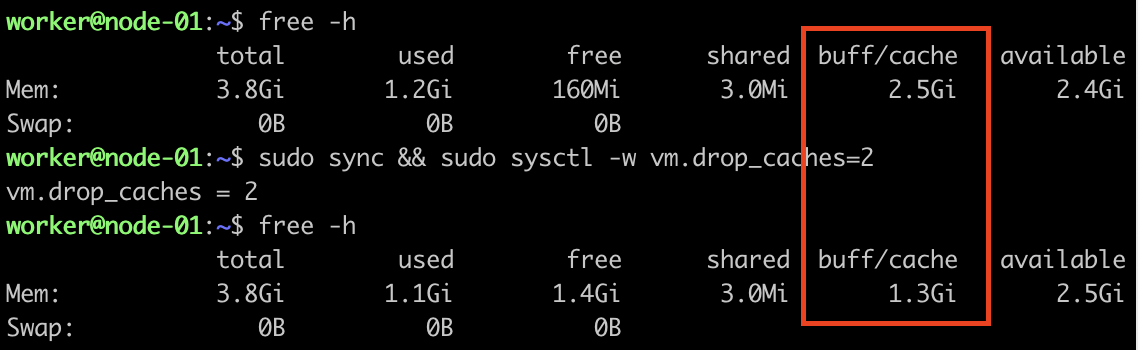
리눅스 서버 캐시 비우기 : sudo sync && sudo sysctl -w vm.drop_caches=2 1. 캐시 비우기 전 동기화 작업 : sudo sync 2. 캐시비우기 : sudo sysctl -w vm.drop_caches=2 1번 성공 후 2번 진행 : sudo sync && sudo sysctl -w vm.drop_caches=2 drop_caches 옵션 상세 설명 링크 : https://www.kernel.org/doc/Documentation/sysctl/vm.txt drop_caches Writing to this will cause the kernel to drop clean caches, as well as reclaimable slab objects like dentries..

System/명령어 2023.10.30

[k8s] Ubuntu 22.04 설치 정리 231029

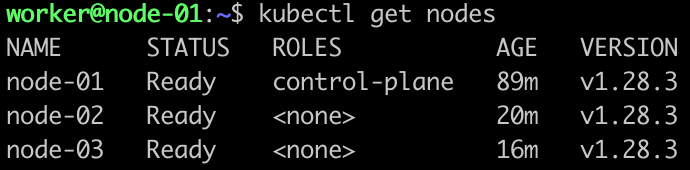
# 개인 메모장이므로 소스 버전과 사설IP 등 수정이 필요합니다.# 환경 : proxmox, VM(ubuntu 22.04.3)# 매우 의존한 자료... : https://tech.hostway.co.kr/2022/08/30/1374/ # OS 세팅# VM 생성 과정에 사용자를 'worker' 생성# 사용자(worker) sudo NOPASSWD 권한추가echo 'worker  ALL=(ALL) NOPASSWD:ALL' | sudo tee -a /etc/sudoers > /dev/null# 초기 패키지 설치sudo apt-get updatesudo apt-get install -y net-tools gcc vim sysstat ca-certificates curl gnupg apt-transport-htt..

Infra 2023.10.29

[Docker] Dockerfile 경량화

출처 : 패캠 gitops Dockerfile 기초 Dockerfile 정의 : 컨테이너의 구성정보를 프로비저닝한 텍스트 template 파일 Dockerfile 흐름 : Dockerfile -> docker build -> image registry(dockerhub) -> deploy docker image Dockerfile 명령어 : https://docs.docker.com/engine/reference/builder/ 빌드 명령어 : docker build -t IMAGE_NAME:TAG [-f DOCKERFILE_NAME] DOCKERFILE_LOCATION Dockerfile 최적화 : 경량의 컨테이너 서비스 제공 dockerfile 작성 고려 사항 : https://docs.docker...

Infra 2023.10.26

[Docker] docker volume 데이터 지속성 및 데이터 관리

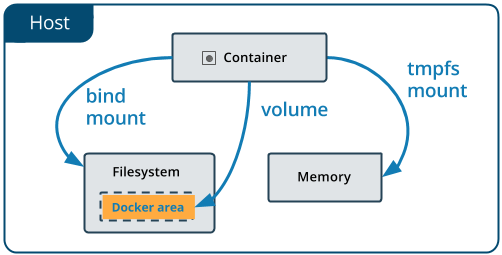
출처 : 패캠 gitops https://docs.docker.com/storage/volumes/ 1. Bind mount 호스트에서 직접적인 관리된다. docker run ~~ -v /host-volume:/app ~~ docker run ~~ --mount type=bind,source=/host-volume ~~ # 리눅스 mount와 유사 예시1 : redis 설치에 config 파일에 패스워드를 설정하여 그 파일을 바인트 마운트 한다. 예시2 : 파일 투 파일로 연동. 시간동기화: /etc/localtime (Dockerfile로 설정이 편하긴함) 2. docker volume 도커의 볼륨 드라이버로 도커가 관리함.(도커에서 권장하는 방법) docker volume create my-volum..

Infra 2023.10.26
728x90